
You’re in a new city, your phone battery is at 3%, and you’re desperately searching for a coffee shop. You tap on an app. It freezes. You try a website. A pop-up ad for something you don’t need covers the entire screen. You finally find the address, but the map is confusing. Your frustration mounts. You’re not just annoyed at the app or the website; you’re annoyed at the entire experience.
Now, imagine the opposite. You tap an app. It loads instantly. A clean map shows you the route, with little coffee cup icons guiding your way. You can see the menu, how busy it is, and even order ahead. You feel calm, in control, and maybe even a little delighted. The coffee tastes better because the journey to get it was seamless.
That difference, that chasm between frustration and delight, is the entire world of User Experience Design, or UX Design.
If you’ve ever wondered why you love some apps and loathe others, or why a website just feels right, you’re already thinking like a UX Designer. This isn’t some mystical, secret club for tech geniuses. It’s a disciplined, empathetic, and incredibly human-centered practice. And it’s everywhere.
So, grab a coffee (the easy-to-find kind), get comfortable, and let’s demystify what UX Design really is.
Beyond Pretty Pixels: What UX Design Actually Means
Let’s get the textbook definition out of the way first. User Experience Design is the process of creating products that provide meaningful and relevant experiences to users. This involves the design of the entire process of acquiring and integrating the product, including aspects of branding, design, usability, and function.
But that’s a bit dry, isn’t it?
Think of it this way: UX Design is the architecture of human interaction with a system. If you were building a house, you wouldn’t just hire someone to pick the paint colors and furniture (that’s more like UI, or User Interface Design, which we’ll get to). You’d first hire an architect. The architect would ask: Who will live here? How do they cook? Do they entertain? Do they have kids? Where does the sun rise? They would design the flow of the rooms, the placement of the lights, the height of the counters—all to create a home that works for the people inside it.
A UX Designer is the architect of digital (and sometimes physical) spaces. They aren’t just concerned with how a button looks, but with what happens before you click it, when you click it, and after you click it. They ask: Is it in the right place? Is the label clear? Does it do what the user expects? What feedback does the user get? Does this flow lead the user to their goal without frustration?
The father of the term, Don Norman, coined it in the 1990s to encompass “all aspects of the user’s interaction with the company, its services, and its products.” It’s holistic. It’s everything.
The UX Designer: The User’s Advocate and the Problem-Solver
So, who is this magical UX Designer? They are part detective, part psychologist, part designer, and part storyteller. Their primary role is to be the unwavering advocate for the user, especially when the user isn’t in the room.
In a business meeting, a stakeholder might say, “Let’s put a giant, flashing ‘BUY NOW’ button everywhere!” A UX Designer would ask, “Why? What problem does that solve for the user? Our research shows that users feel pressured by that and abandon their carts. What if we instead build trust by showing them security badges and a clear return policy?”
A UX Designer is constantly balancing business goals (sell more products) with technical constraints (this is hard to build) and, most importantly, user needs (I want to feel confident in my purchase).
Their toolkit isn’t just Adobe Creative Suite. It’s empathy, curiosity, and a relentless desire to make things better.
The Pillars of User Experience Design: It’s More Than Just Usability
To understand the breadth of User Experience Design, we can break it down into several key components. Think of these as the foundational pillars that hold up a great experience.
1. Usability: The Foundation of Function
If a product isn’t usable, nothing else matters. Usability is about how easy, efficient, and pleasant a product is to use. Can users achieve their goal without pulling their hair out? The core qualities of usability are:
-
Learnability: How easy is it for users to accomplish basic tasks the first time they encounter the design?
-
Efficiency: Once users have learned the design, how quickly can they perform tasks?
-
Memorability: When users return to the design after a period of not using it, how easily can they re-establish proficiency?
-
Errors: How many errors do users make, how severe are these errors, and how easily can they recover from them?
-
Satisfaction: How pleasant is it to use the design?
A perfectly usable door is one you know instantly whether to push or pull, without a confusing sign.
2. Usefulness: Does It Solve a Real Problem?
A product can be incredibly usable but completely useless. If you design the world’s most intuitive and easy-to-use app for calculating the weight of clouds, but no one needs to do that, it’s a failure. Usefulness means the product addresses a genuine user need and provides value. It solves a problem or fulfills a desire.
3. Desirability: The Emotional Connection
This is where emotion, branding, and aesthetics come in. Desirability is about creating an emotional bond. It’s what makes you prefer an iPhone over an Android, or vice-versa. It’s the sleek look, the satisfying sound of a notification, the clever micro-copy that makes you smile. Apple is a master of desirability. Their products aren’t just usable and useful; they are objects of desire.
4. Findability: Can You Find What You Need?
If a user can’t find a feature or a piece of information, it might as well not exist. Findability applies to both the product itself (is the navigation clear?) and to the content within it (can I search for what I need?). A website with a terrible search function and a confusing menu has poor findability.
5. Accessibility: Can Everyone Use It?
This is non-negotiable. Accessibility means designing products to be usable by people with the widest possible range of abilities, including those with visual, auditory, motor, or cognitive disabilities. It’s about making sure a screen reader can interpret your website, that color isn’t the only way to convey information (for color-blind users), and that interactive elements are large enough to tap. Ethical and often a legal requirement, accessibility is simply good User Experience Design.
6. Credibility: Can You Trust It?
Does the user believe what you tell them? Credibility is built through good design, honest content, security seals, transparent policies, and a lack of dark patterns (deceptive design tricks). A website that looks like it’s from 1998, has spelling errors, and asks for your social security number upfront has low credibility.
The UX Design Process: A Roadmap from Problem to Solution
So, how does a UX Designer actually do their job? It’s not a chaotic, artistic frenzy. It’s a structured, iterative process. While the names of the stages can vary, the core philosophy is constant: Understand, Explore, Materialize, and Evaluate.
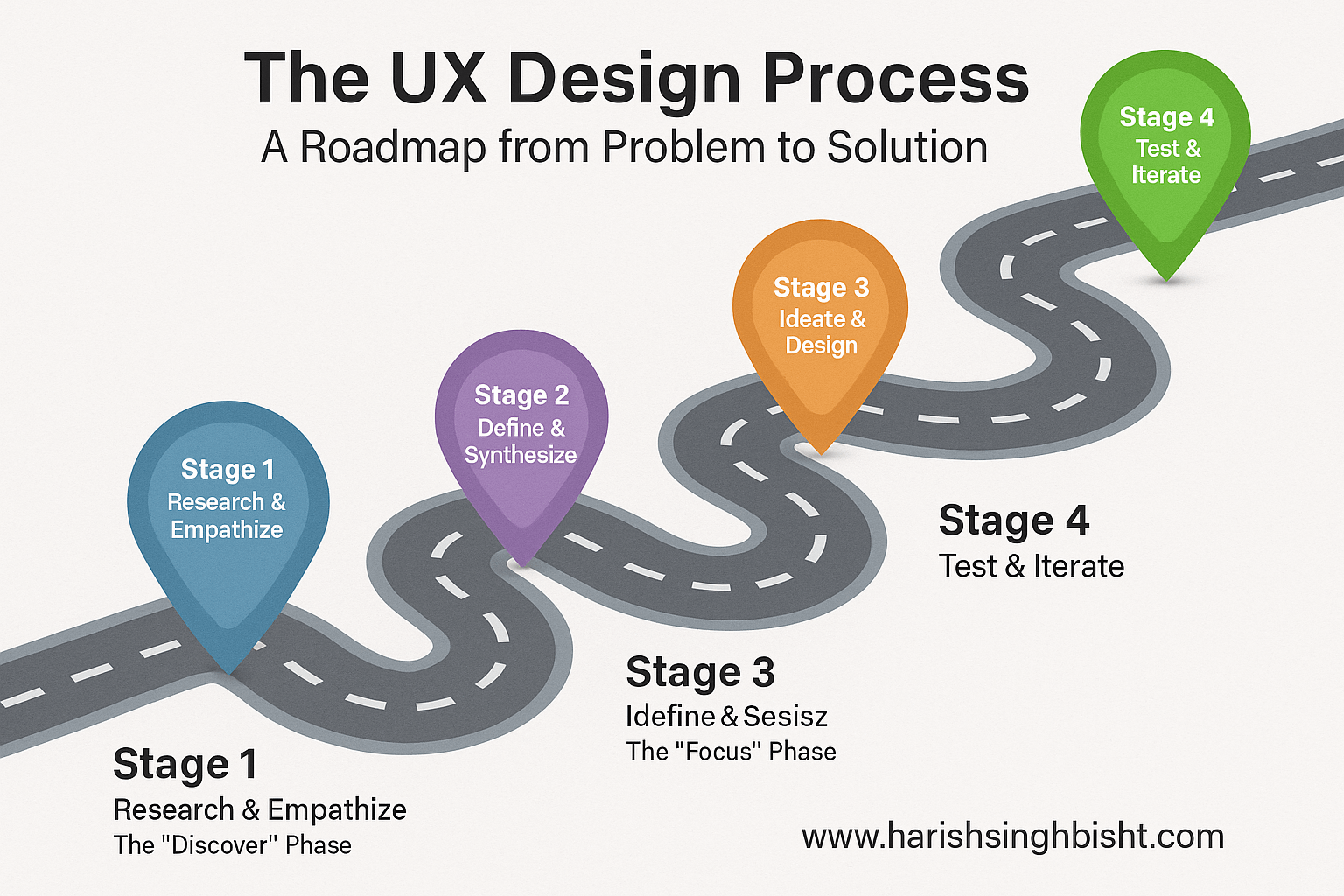
Stage 1: Research & Empathize – The “Discover” Phase
Before a single pixel is designed, a UX Designer must become a expert on the user. This phase is all about quenching curiosity.
-
User Interviews: Sitting down (in person or virtually) with real or potential users to understand their motivations, frustrations, goals, and behaviors. This is qualitative gold.
-
Surveys & Questionnaires: Reaching a larger audience to gather quantitative data on user preferences and demographics.
-
Competitive Analysis: Studying competing products to see what works, what doesn’t, and where there are gaps in the market.
-
Contextual Inquiry: Observing users in their natural environment—where they would actually use the product—to see unspoken challenges and workarounds.
The goal here is to build empathy. The UX Designer creates artifacts like User Personas (fictional, archetypal representations of key user groups) and Empathy Maps to keep the user’s voice central throughout the entire process.
Stage 2: Define & Synthesize – The “Focus” Phase
Now, it’s time to make sense of all the data gathered. The goal is to define the core problem you are trying to solve.
-
Affinity Diagramming: Grouping observations from research into themes and patterns to find common threads.
-
Problem Statements: Crafting a clear, concise statement of the user’s core problem. For example: “A busy parent needs a quick and reliable way to order healthy groceries because they are overwhelmed with childcare and have limited free time.”
-
User Journey Maps: Visualizing the entire process a user goes through to accomplish a goal. This map highlights their emotions, pain points, and moments of delight at every touchpoint.
This stage ensures the entire team is aligned on what to build before they figure out how to build it.
Stage 3: Ideate & Design – The “Create” Phase
This is the part most people picture when they think of design. With a clear problem defined, the team brainstorms potential solutions. No idea is a bad idea at the start.
-
Sketching: Quick, low-fidelity drawings to get ideas out fast.
-
Wireframing: Creating basic, skeletal layouts of a page or screen. Think of it as the blueprint. Wireframes focus on structure, layout, and functionality, not color or style. Tools like Balsamiq or Figma are popular for this.
-
Prototyping: Building an interactive model of the final product. A prototype can be anything from a series of linked screens (a clickable wireframe) to a high-fidelity, pixel-perfect simulation that looks and feels like the real app. Prototypes are used to test ideas before investing in expensive development.
Stage 4: Test & Iterate – The “Validate” Phase
This is where the magic of iteration happens. You take your prototypes and put them in front of real users.
-
Usability Testing: Observing users as they attempt to complete tasks using your prototype. You watch where they succeed, where they struggle, and where they get confused. You listen to their feedback. The key is to test early and test often.
-
A/B Testing: For live products, you might create two versions of a page (A and B) with one variation (e.g., a different colored button) and see which one performs better.
The insights from testing are fed right back into the process. Maybe you go back to the Ideate stage. Maybe you realize you defined the problem wrong and need more research. This loop of designing, testing, and refining is the heart of User Experience Design.
The Handoff and Beyond: Collaboration is Key
A UX Designer doesn’t work in a silo. Once the experience is validated, they collaborate closely with:
-
UI Designers: Who take the wireframes and prototypes and make them beautiful, applying colors, typography, and visual polish.
-
Developers: Who bring the design to life with code. A good UX Designer provides clear documentation and works with developers to ensure the final product matches the intended experience.
-
Product Managers: Who define the product vision and business objectives.
-
Content Strategists & Writers: Who craft the words within the product (microcopy) to ensure the tone and language are clear and helpful.
The job isn’t over once the product launches. A UX Designer continues to monitor user feedback, analytics, and performance data to plan for future iterations and improvements.
UX vs. UI: The Classic Confusion (Finally Explained!)
This is the big one. People use these terms interchangeably, but they are distinctly different, though deeply interconnected.
Let’s go back to our house analogy.
-
UX Design is the architecture. It’s the foundation, the floor plan, the flow of the rooms, the placement of the electrical outlets. It’s about how the house works and feels to live in.
-
UI Design is the interior design. It’s the paint colors, the furniture, the light fixtures, the throw pillows. It’s about how the house looks.
You can have a beautifully designed house (great UI) with a terrible floor plan where you have to walk through the bedroom to get to the kitchen (awful UX). Conversely, you can have a perfectly functional floor plan (great UX) with ugly paint and dated furniture (bad UI). The goal, of course, is to have both a well-architected and beautifully decorated house.
In digital terms:
-
A UX Designer decides that a shopping cart icon should be persistent at the top of an e-commerce site.
-
A UI Designer decides that the icon is a minimalist black bag, turns red when you add an item, and has a satisfying animation when you click it.
Both are crucial. The UX Designer focuses on the user’s journey and its logical flow; the UI Designer focuses on the visual touchpoints the user interacts with along that journey.
Why Does UX Design Matter? It’s Not Just “Nice to Have”
In the past, UX was often seen as a luxury. Today, it’s a business imperative. Here’s why:
-
It Saves Money: Fixing a problem after development is exponentially more expensive than fixing it during the design phase. Good UX identifies issues early.
-
It Increases Conversion & Revenue: A smooth, intuitive checkout process on an e-commerce site directly leads to more completed purchases. Every removed friction point is a potential boost to the bottom line.
-
It Builds Customer Loyalty & Trust: A positive experience makes users feel respected and valued. They are more likely to return, to recommend your product, and to become brand advocates.
-
It Provides a Competitive Advantage: In a crowded market, a superior user experience is a powerful differentiator. People will choose a product that is easier and more enjoyable to use, even if it has fewer features.
-
It Improves Internal Efficiency: When a UX Designer creates a clear, well-documented system, it reduces confusion and rework for the entire product team, from developers to marketers.
Real-World UX: It’s Not Just for Apps
While we’ve focused on digital products, User Experience Design is everywhere.
-
The Supermarket: The layout of the aisles, the placement of essential items (milk at the back to make you walk past other products), the design of the shopping cart—all are carefully considered experiences.
-
An Airport: The signage that guides you from check-in to your gate, the flow of security, the availability of charging stations. Good airport UX reduces stress; bad UX creates chaos.
-
A Coffee Maker: Is it intuitive to program? Is the water reservoir easy to fill? Is the coffee pot easy to clean? These are all UX questions.
Whenever humans interact with a system, there is a user experience, and therefore, an opportunity for User Experience Design.
How to Think Like a UX Designer (Right Now)
You don’t need a fancy title to start practicing UX. You just need a shift in perspective. Next time you use an app, a website, or even a physical product, ask yourself these questions:
-
What is my goal here? Am I achieving it easily?
-
What is frustrating me? Why is it frustrating?
-
What do I enjoy about this? Why does it feel good?
-
Is there anything confusing? Anywhere I get stuck?
-
If I could change one thing, what would it be?
You are now critiquing the user experience. You are building empathy for other users. You are thinking like a UX Designer.
Conclusion: UX is Human-Centered Problem Solving
At its core, User Experience Design is not about technology. It’s about people. It’s a practice rooted in empathy, a process driven by curiosity, and a craft dedicated to removing friction and creating delight in the interactions that fill our daily lives.
It’s the silent, often invisible, force that makes the digital world feel less like a machine and more like a helpful assistant. It’s the reason you can navigate a complex website without a manual, or order a taxi with a few taps, or connect with a loved one across the globe effortlessly.
The next time you have a seamless, pleasant experience with a product, take a moment to appreciate the unseen work of the UX Designer who advocated for you. They asked the questions, they listened, they tested, and they iterated—all to make your life just a little bit easier.
And if you’re considering a career in this field, know that it’s a path for those who love puzzles, who care deeply about people, and who find joy in the quiet victory of a problem solved. The world needs more people dedicated to building a more intuitive, accessible, and human-friendly future. The world needs more UX Designers.
To see these principles in action, you can look to the work of seasoned professionals who have been shaping digital experiences for years. For instance, Harish Singh Bisht (www.harishsinghbisht.com), a UX professional with over 16 years of experience, exemplifies this career path. His journey in web design and user experience showcases the deep impact that a dedicated UX Designer can have in crafting products that are not only functional but truly resonate with users. Exploring the portfolios and insights of experts like him can provide invaluable, real-world inspiration for your own journey into the world of User Experience Design.